
Table of Contents
Is Wordfence Really an “Install-and-Forget” Security Plugin?
The Performance Impact of Wordfence
Who Should Use Wordfence and Who Shouldn’t?
The Limits of Wordfence’s Protection
Where Wordfence Has Caused Us Problems
Where Wordfence Has Proven Its Value
How Much Does Wordfence Cost in 2026?
Wordfence Review 2026: Is It Still the Best WordPress Security Plugin?
Wordfence calls itself the global leader in WordPress security. Does it live up to that claim? Let’s find out.
We’ve been running Wordfence across client sites for the past 3-4 years, and in the mean time, we’ve fielded the same handful of questions over and over from site owners trying to figure out whether it’s actually worth installing. So instead of writing another feature-by-feature breakdown, we wanted to put together the review we wish we’d had when we started: what Wordfence actually does, where it’s genuinely good, and where it’s let us down in practice.
If you’re a first-time WordPress owner, an agency managing a handful of client sites, or a business owner trying to decide between free and paid, this one’s for you.
What Wordfence Actually Is

Wordfence is built by Defiant Inc, founded back in 2012, and it’s grown into the most widely installed dedicated security plugin for WordPress, millions of active installs and counting. At its core, it bundles three things WordPress doesn’t give you out of the box:
- A firewall that filters incoming traffic
- A malware scanner that checks your files for signs of compromise
- Login-hardening tools, including two-factor authentication
Everything lives inside your normal WordPress dashboard. No separate console, no DNS changes, which is a big part of why it’s so popular with people who aren’t security specialists.
Is Wordfence Really an “Install-and-Forget” Security Plugin?
This is the first question we get, and the honest answer is: the basic setup is genuinely easy, but getting real value out of it takes more than that.
Wordfence has a learning mode that watches your site’s traffic for a while before it starts building firewall rules around it. That’s a nice touch, it means the defaults aren’t totally blind to how your site actually behaves. But once you’re past that initial setup, getting the most out of it does take some technical know-how. The firewall can get a little overzealous, and figuring out what to loosen or tighten is something a non-technical site owner will likely need help with at some point.
The Performance Impact of Wordfence
Wordfence slow down your site, and this is worth knowing going in. Wordfence runs as an endpoint firewall. It executes on your own server, using your own CPU and RAM, rather than sitting at the network edge the way something like Cloudflare does. Think of it like a security guard stationed just inside your front door rather than at the gate outside: visitors still have to reach the door before anyone decides whether to let them in.
In practice, that means scans and the firewall constantly running in the background compete for the same resources your site uses to actually serve pages. On a well-resourced server this is barely noticeable. On shared hosting, it can be a real problem, some hosts have even restricted or banned Wordfence for exactly this reason. The fix we’ve found that works well: schedule scans for your lowest-traffic hours rather than letting them run whenever.
Wordfence does offer an “Extended Protection” mode that moves the firewall earlier in the request cycle, before WordPress core even loads, which closes some of that gap. But it requires manual setup and doesn’t play nicely with every hosting configuration, so it’s not a given for everyone.
Who Should Use Wordfence and Who Shouldn’t?
Based on what we’ve seen across client sites, Wordfence is a strong fit for:
- Small to medium-sized websites
- Small e-commerce stores
- Business-critical sites that want solid real-time protection without an enterprise price tag
Where we’d steer people away from it:
- Shared hosting environments, purely because of the performance hit described above
- High-traffic publishers and large-volume sites, where the resource demands of running a server-side firewall stop making sense. Those are better served by third-party, network-level solutions
If you’re squarely in the small-to-medium range, Wordfence’s combination of strong protection and low cost is genuinely hard to beat. If you’re outside that range in either direction, it’s worth looking elsewhere.
The Limits of Wordfence’s Protection
This is the part that surprises people most, so it’s worth being direct about it.
It only acts once a request reaches your server. Wordfence sits inside your WordPress installation, which means it can’t stop anything at the DNS or network level the way Cloudflare, Sucuri, or MalCare can. By the time Wordfence is evaluating a request, that request has already arrived at your door.
Beyond that, here’s what’s outside its scope:
- Zero-day threats – it can’t catch what it doesn’t have a signature for yet
- SSL certificate checks – not its job
- Keeping plugins and themes updated – it’ll flag known vulnerabilities, but it won’t manage updates for you
- REST API endpoint monitoring – a genuine gap
- Database-only compromises – the malware scanner checks your files against known checksums and signatures, but it doesn’t look inside your database. A malicious admin account created via SQL injection, or spam content injected directly into posts, can sail right past it.
The firewall itself is genuinely one of the strongest pieces of the product. It’s just not the whole picture, and we’d never recommend treating it as your only line of defense.
Where Wordfence Has Caused Us Problems
This isn’t a limitation unique to Wordfence, it’s a challenge with any firewall that runs inside the WordPress application. If rate limiting or login protection is configured too aggressively, you can accidentally lock out your own administrators. We’ve encountered this more than once, usually after a configuration change or during periods of unusually high bot traffic. While it’s typically recoverable through server access, it can be frustrating when it happens. The key takeaway is that firewall settings need to be configured carefully to strike the right balance between strong security and uninterrupted access.
Where Wordfence Has Proven Its Value
We were early adopters of Wordfence Premium because many of our clients wanted robust security without committing to an ongoing security service. Over the years, it has consistently proven effective at detecting malicious code, identifying malware, and helping us clean up compromised websites. While these capabilities aren’t unique to Wordfence, most mature security plugins offer similar protection. We’ve found Wordfence to be reliable, accurate, and dependable in real-world situations, making it a tool we continue to trust for many client websites.
Two things we’d genuinely call out as standout strengths:
- The firewall, We’d put it ahead of most other application-level WordPress security plugins we’ve used.
- Their threat research and alerting – Wordfence runs one of the largest threat-intelligence operations in the WordPress space, and even their free newsletter is worth subscribing to, the malware and vulnerability updates they put out are genuinely useful, and for anyone working as a WordPress developer, staying on top of that information is practically part of the job.
A Heads-Up for Agencies Relying on the Standalone Login Plugin
If you’ve been using the standalone Wordfence Login Security plugin to add lightweight 2FA to client sites without installing the full security suite, that plugin is being discontinued starting July 2026.
We used this approach across a number of client sites specifically to keep plugin stacks minimal. Free 2FA itself isn’t going away; it remains part of the main Wordfence plugin. But the standalone option disappearing means migration work – moving affected sites over to the full plugin or finding an alternative, plus the testing, documentation, and client coordination that comes with it. If you’re managing multiple sites this way, it’s worth getting ahead of this now rather than scrambling in July
How Much Does Wordfence Cost in 2026?
Wordfence’s pricing has stayed fairly stable, with four tiers as of 2026:
Plan | Price | Best suited for |
Free | $0 | Entry-level sites needing basic protection |
| Premium | $149/year per site | Self-managed sites that want real-time threat protection |
| Care | $590/year per site | Business owners who want Wordfence’s team to install, optimize, and monitor the plugin for them |
| Response | $1,250/year per site | Mission-critical sites that need a guaranteed 1-hour incident response, 24/7/365 |
A few practical note: a license also covers a staging/dev environment, and a WordPress Multisite network needs only one license regardless of how many sub-sites it has. Care and Response are priced higher because you’re paying for human-driven services – audits, monitoring, incident response and not just software, so whether they’re worth it really comes down to whether you’d otherwise be paying a developer or agency to do that work manually.
If budget is tight, a free Cloudflare setup paired with the free Wordfence plugin can get you a genuinely solid, layered defense,it just asks more of you in terms of time and technical comfort than paying for an all-in-one plan would.
Free vs. Premium: Missing Factor
This is the question that matters most for budget-conscious owners, so let’s be precise about it.
Yes, you do miss out on protection if you stick with free, though maybe not in the way people expect. Free and paid users run the exact same scanner and firewall code. The difference is entirely about how fresh the threat data is:
Features | Free | Premium / Care / Response |
Firewall rules | 30-day delay | Real-time |
Malware signatures | 30-day delay | Real-time |
Real-time IP blocklist | No | Yes |
Country blocking | No | Yes |
Audit log | None | 30 days to 1 year, by tier |
That 30-day delay on the free tier is the single biggest thing to understand here. It’s not a marketing nudge, it’s a real exposure window. When Wordfence’s research team finds a new vulnerability and ships a fix, free users don’t get it for a month. That’s often exactly the window when attackers move fastest, since exploits tend to get weaponized quickly after disclosure.
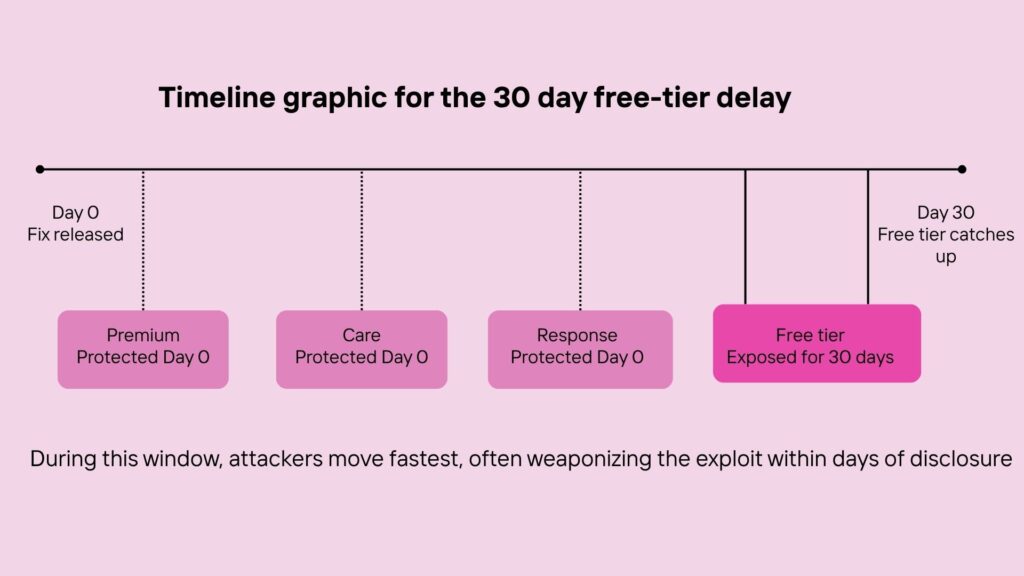
Everything else on the free tier is solid – firewall, malware scanning, and 2FA are all included, which is more than a lot of competing “free” plugins offer. But if you’re running anything you’d consider business-critical, that 30-day gap is the real argument for upgrading, not the extra dashboard features.
Our take
Wordfence has earned its reputation, and after several years of using it across multiple sites, we still trust it. The free tier is unusually complete, the firewall holds up well against other application-level competitors, and their threat research team is genuinely excellent at finding and disclosing real vulnerabilities.
Our honest recommendation: if you’re small to medium-sized, it’s an excellent core layer of protection. Pair it with good hosting, regular updates, and backups, and you’re in solid shape. If you’re high-traffic or running a large publication, look at network-edge solutions instead. And if you’re currently relying on the standalone Login Security plugin, start planning your migration before July.

Leave a Reply
Articles
Related Insights.
Blogs and Resources on WordPress, WooCommerce, SEO and Marketing
Leave a
Comment.